
Download XP Smoker – Windows registry, disk cleaning, system optimization, advanced settings, customization, diagnostic tools, performance enhancement, Windows XP, system tweaks
Overview
XP Smoker is a utility application designed for users seeking advanced control over their Windows operating system, particularly those working with legacy environments such as Windows XP. The app serves as a toolkit for system customization, performance enhancement, and diagnostic troubleshooting. By providing access to hidden system functions, XP Smoker empowers users to modify settings that are typically restricted or inaccessible through standard interfaces. This makes it a valuable tool for power users, system administrators, and IT professionals who require granular control over system behavior.
The application addresses common challenges such as system slowdowns, cluttered storage, and limited customization options by offering built-in tools for registry editing, disk cleanup, and interface personalization. Real-world use cases include optimizing older machines for better responsiveness, resolving configuration issues through registry adjustments, and tailoring file explorer behavior to suit workflow preferences. Its focus on advanced settings positions it within a niche segment of the software ecosystem—where precision and control outweigh ease of use.
Although the developer did not provide additional technical details about their background or organizational structure, the app’s release date of June 4, 2013, indicates it was created during a period when Windows XP remained widely used. This historical context underscores its relevance for users maintaining older systems. Despite its age, XP Smoker continues to serve as a reference point for utility tools focused on deep system access and manual optimization.
Key Features & Functionality
- Registry Access: XP Smoker enables direct interaction with the Windows registry, allowing users to modify low-level system configurations. This feature is ideal for advanced users who need to adjust startup behaviors, disable unnecessary services, or fine-tune system policies. For example, a user experiencing slow boot times can use registry edits to disable non-essential startup programs.
- Disk Cleaning Tools: The built-in disk cleaner scans for temporary files, cache data, and obsolete system logs. It provides a user-controlled interface to identify and remove these files, freeing up disk space and improving system speed. This is particularly useful on systems with limited storage capacity.
- Explorer Customization: Users can modify Windows Explorer settings such as column visibility, context menu options, and folder view defaults. This level of control allows for a more efficient file management experience tailored to individual workflows, such as disabling thumbnails for faster browsing on large directories.
- Enhanced Diagnostic Tools: These tools provide insights into system performance metrics like CPU usage, memory allocation, and disk I/O. While not real-time monitoring, they support troubleshooting by highlighting potential bottlenecks and offering corrective actions based on diagnostic output.
Each feature is designed to support hands-on system management, offering a level of flexibility not found in standard Windows utilities. The integration of these tools into a single interface reduces the need for multiple third-party applications, streamlining the optimization process.
Interface, UX & Performance
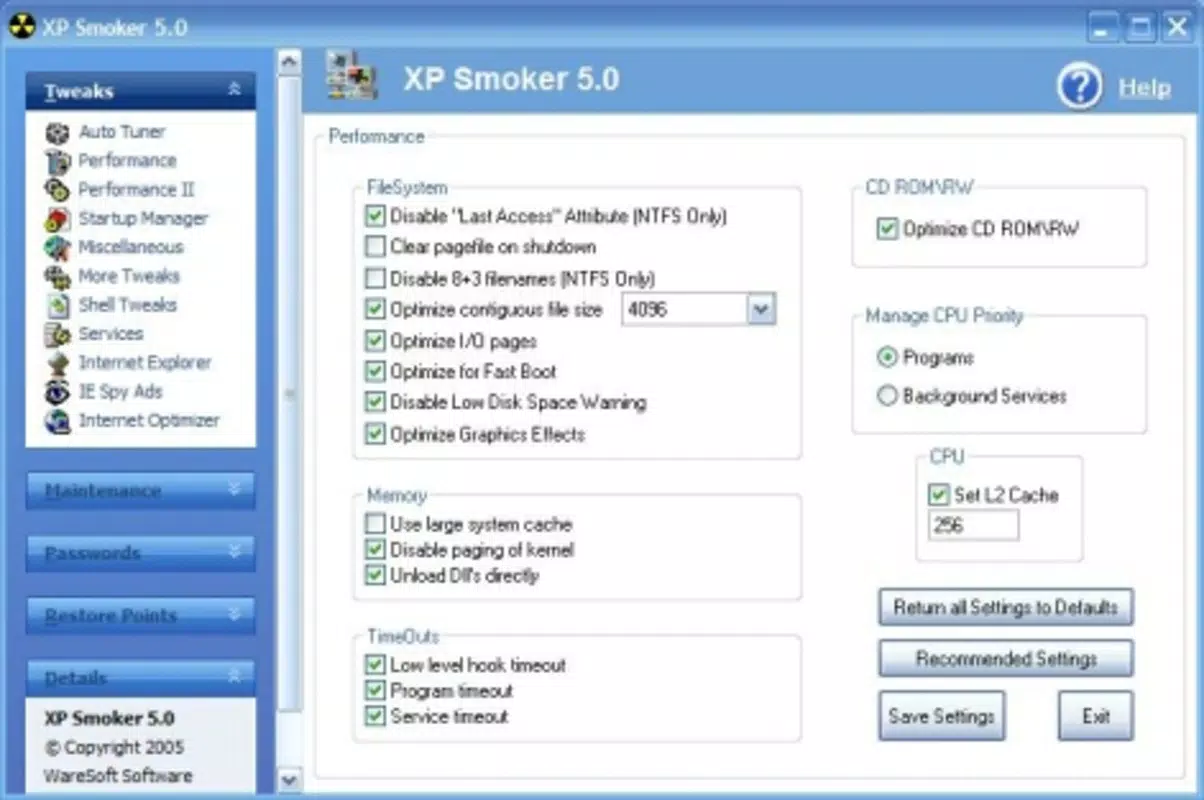
XP Smoker features a straightforward, no-frills interface that prioritizes functionality over visual polish. The layout is organized into clearly labeled sections, each corresponding to a specific tool—registry access, disk cleanup, explorer settings, and diagnostics. Navigation is linear and intuitive, with minimal onboarding required for first-time users familiar with system-level operations.
Although the developer did not list formal performance metrics, the application’s lightweight design suggests it runs efficiently on older hardware. Its 5.3 MB file size indicates minimal resource consumption, making it suitable for systems with limited RAM and processing power. The app responds quickly to user inputs, and transitions between features are smooth, even on machines with slower processors.
Stability appears to be consistent, given the app’s long-standing presence without reported widespread crashes. However, since no formal testing data was provided, users should exercise caution when modifying the registry or deleting system files. The lack of a built-in backup function for registry changes means users must manually safeguard configurations before applying edits.
Platform Compatibility & Technical Requirements
XP Smoker is designed for the Windows operating system. It is compatible with Windows XP, as indicated by its semantic keywords and release context. The application has a file size of 5.3 MB, which suggests it is optimized for low-resource environments.
The developer did not specify minimum OS requirements beyond the known compatibility with Windows XP. No information was provided about support for newer Windows versions such as Windows 7, 8, or 10. As such, users should verify compatibility before installation, especially on modern systems where legacy software may not function due to security restrictions or missing system libraries.
Since the app is free and does not require an internet connection for core functionality, it remains accessible to users seeking offline tools for system maintenance. However, users should ensure their systems meet basic prerequisites for running Windows XP applications, including appropriate processor architecture and available disk space.
Pros and Cons
- Provides direct access to the Windows registry for advanced system tweaking
- Includes built-in disk cleaning tools to free up storage and improve performance
- Offers extensive customization options for Windows Explorer
- Integrates diagnostic tools to identify system bottlenecks
- Lightweight design with minimal system resource usage
- Free to download and use
- Designed for Windows XP; compatibility with newer systems is uncertain
- Limited user support or documentation provided
- No built-in backup feature for registry modifications
- Outdated interface with no modern visual enhancements
- Lacks automatic update notifications
FAQ
Is XP Smoker safe to use on my Windows system?
XP Smoker is a utility tool that grants access to system-level functions. While it is free and functional, users should exercise caution when modifying the registry or deleting system files. Always back up critical configurations before making changes.
Can I install XP Smoker on Windows 10 or 11?
There is no official confirmation of compatibility with Windows 10 or 11. The app was released in 2013 for Windows XP, and newer operating systems may block legacy applications due to security policies. Testing on a virtual machine is recommended before installation.
Does XP Smoker require an internet connection?
No, the core features of XP Smoker do not require an internet connection. It operates as a standalone tool for local system optimization and diagnostics.
How often should I run the disk cleaning tool?
Users may run the disk cleaner weekly or as needed when noticing reduced system performance. Regular cleanup helps maintain optimal storage and speed, especially on systems with limited disk space.
Are there any updates available for XP Smoker?
The developer has not released any update information since the initial release. Users should check trusted sources for potential newer versions, but no official update mechanism is currently documented.
Final Thoughts
XP Smoker remains a niche but functional utility for users working with legacy Windows systems. Its combination of registry access, disk cleaning, customization, and diagnostic tools offers a comprehensive toolkit for advanced users who value control over their computing environment. While its age and lack of modern features are notable limitations, the app continues to serve a specific audience seeking performance enhancement and system customization without relying on third-party software.
For users maintaining older machines or managing Windows XP environments, XP Smoker provides a reliable, lightweight solution. Its free status and minimal system footprint make it an attractive option for those prioritizing functionality over aesthetics. However, caution is advised when using registry-editing tools, especially without prior backup.
Download XP Smoker now


